Showing posts with label printer. Show all posts
Showing posts with label printer. Show all posts
Monday, February 17, 2014
How to Install a Printer
Printers have become a must household item that many computer companies have packaged computers with inexpensive printers. However, despite the fact these printers were being shipped with a specific computer, these printers can be installed on any other computer as well. Theore, knowing how to install a printer is important. While it is straight forward, it can be confusing on how to configure it to the specific computer.
How to Install a Printer
Find a suitable place for the printer and set it up there so that the cables can reach the computer as well as an electrical outlet. Because printing has become increasingly precise, it is important to keep the printer flat. Once it is set up and it has been plugged in, turn the computer on. When it loads, the computer will prompt you to recognize and install the software that goes along with the hardware.
Put the installation CD into the computer and let it load. If you dont have the CD, typically you can find the drivers on the companys website. When the installation software opens, set up the installation and put it into a folder where youll remember where it is. Install the software and then allow it to run through. Once it has installed, restart the computer to ensure that all the components get added properly.how to Install a Printer
Now that the computer has been added, its time to make it the default printer. Open the control panel and double click on the printers tab. This will open up and share a list of all the current printers that you have on this computer. Pick the one that you just installed and open the details. It will ask whether or not you want this to be the default printer. Press the yes button and then hit apply before closing this tab down.
Finally, open a word document and do a test print. If it is the first time the printer is being used, itll print an elaborate scheme of colors and text to make sure everything is working. Then, print something for yourself to finalize whether it works or not. If all looks good, the printer will have been successfully installed and can theore be used whenever it is needed.
Read more...
How to Install a Printer
Find a suitable place for the printer and set it up there so that the cables can reach the computer as well as an electrical outlet. Because printing has become increasingly precise, it is important to keep the printer flat. Once it is set up and it has been plugged in, turn the computer on. When it loads, the computer will prompt you to recognize and install the software that goes along with the hardware.
Put the installation CD into the computer and let it load. If you dont have the CD, typically you can find the drivers on the companys website. When the installation software opens, set up the installation and put it into a folder where youll remember where it is. Install the software and then allow it to run through. Once it has installed, restart the computer to ensure that all the components get added properly.how to Install a Printer
Now that the computer has been added, its time to make it the default printer. Open the control panel and double click on the printers tab. This will open up and share a list of all the current printers that you have on this computer. Pick the one that you just installed and open the details. It will ask whether or not you want this to be the default printer. Press the yes button and then hit apply before closing this tab down.
Finally, open a word document and do a test print. If it is the first time the printer is being used, itll print an elaborate scheme of colors and text to make sure everything is working. Then, print something for yourself to finalize whether it works or not. If all looks good, the printer will have been successfully installed and can theore be used whenever it is needed.

Thursday, November 28, 2013
Epson Stylus 600 printer resetter

This procedure is to reset the Epson Stylus 600 printer when are the lights will blink and will not let you print.
Para realizar el reset lo que tiens que hacer es lo siguiente: To perform the reset tiens what to do is the following:
Hay que presionar y mantener apretado el boton de LOAD/EJECT (tomar hoja) y el de Cleaning (limpieza) . We must press and hold the button LOAD / EJECT (take up) and the Cleaning (cleaning).
Mientras mantienes apretados esos botones , tienes que presionar el boton de POWER (encendido) y tenerlo apretado hasta que las luces (ink out – tinta vacia y paper out- falta papel) empiezan a titilar o parpadear. While holding these buttons, you must press the power button (on) and keep it tight until the lights (ink out - empty ink and paper out-out of paper) start to flash or flicker.
Cuadno suceda esto suelta todos los botones. When it has to happen this release all buttons.
Cuando pasen 3 o 4 segundos apreta y mantenlo apretado el boton de CLEANING (limpieza) hasta que las luces que titilaban dejen de hacerlo. When you spend three or four seconds click and hold down the button CLEANING (cleaning) until the lights flickered stop.
YA ESTA!!! NOW THIS! ya quedo lista para usarla!! and am ready to use!
Seria conveniente que cada vez que se haga este procedimiento hacer una limpieza a la esponja interna de la impresora, por que alli deja depositado todo el exceso de tinta de la impresora y podria derramarse. It would be desirable that each time you do this procedure done to clean the sponge inside the printer, because there left on deposit all excess ink from the printer and may spill. Esto no es 100 % necesario pero seria muy bueno que lo hagas. This is not 100% necessary but it would be very good to do so.
Para realizar el reset lo que tiens que hacer es lo siguiente: To perform the reset tiens what to do is the following:
Hay que presionar y mantener apretado el boton de LOAD/EJECT (tomar hoja) y el de Cleaning (limpieza) . We must press and hold the button LOAD / EJECT (take up) and the Cleaning (cleaning).
Mientras mantienes apretados esos botones , tienes que presionar el boton de POWER (encendido) y tenerlo apretado hasta que las luces (ink out – tinta vacia y paper out- falta papel) empiezan a titilar o parpadear. While holding these buttons, you must press the power button (on) and keep it tight until the lights (ink out - empty ink and paper out-out of paper) start to flash or flicker.
Cuadno suceda esto suelta todos los botones. When it has to happen this release all buttons.
Cuando pasen 3 o 4 segundos apreta y mantenlo apretado el boton de CLEANING (limpieza) hasta que las luces que titilaban dejen de hacerlo. When you spend three or four seconds click and hold down the button CLEANING (cleaning) until the lights flickered stop.
YA ESTA!!! NOW THIS! ya quedo lista para usarla!! and am ready to use!
Seria conveniente que cada vez que se haga este procedimiento hacer una limpieza a la esponja interna de la impresora, por que alli deja depositado todo el exceso de tinta de la impresora y podria derramarse. It would be desirable that each time you do this procedure done to clean the sponge inside the printer, because there left on deposit all excess ink from the printer and may spill. Esto no es 100 % necesario pero seria muy bueno que lo hagas. This is not 100% necessary but it would be very good to do so.
Saturday, November 23, 2013
HOW TO RESET CANON PRINTER PIXMA IP1980

Canon PIXMA iP1980 Photo Printer is same as Canon Pixma ip 1880,
TO FIX PRINTER ERROR "parts inside printer end service life, waste ink pad counter overflow error, waste ink absorber full error you should use General resetter Tools for Canon Pixma ip 1880.
How you can reset ink level on Canon Pixma iP1800
Step1. Press and hold the power button while plugging in the powerchord - green lamp will glow.
Step2. Hold the power button and press the resume button twice - the orange lamp will blink and return to green.
Step3. Release the power button - the prnter will be ready.
Step4. Print a test page.
Step5. Printer is Ok Now.
You Can Use General Tool Also To Reset iP1980.
Download General Tool
Wednesday, November 20, 2013
Reset waste ink pad counter overflow error for Epson L100 printer
.png)
Reset waste ink pad counter overflow error for Epson L100 printer
FIX PRINTER ERROR "parts inside printer end service life, waste ink pad counter overflow error"
Resetter of Epson L100 printer and How to Use it :
Reset tool of epson L100 can be downloaded at the following link Ziddu:
Password: www..comExtract using unzip program.
steps:1
Turn on Epson L100 and make sure that Espon L100 printer is connect to the computer.
Then run Reset tool AdjProgcracked.exe, by double clicking the file "AdjProg cracked.exe"
Step:2
Click "accept" Next "Particular Adjustment Mode" Then Select "Waste ink pad counter reset"
Next click "Check" Then uncheck "play pad counters, FL Boxes counter, tube Ink Counter", then click the "initialization" Then "Finish".
Step:3
Turn off the Epson L100 printer, then disconnect the power of the printer.
Step:4
Reattach the power cord and turn on the printer, wait a while until Epson L100 ready.
Now Epson L100 is ready for use again.
Wednesday, November 13, 2013
Free Download Epson Series printer Service Manual here

Epson ActionPrinter 2000 2.1 Mb
Epson ActionPrinter 3000 1.1 Mb
Epson ActionPrinter 4000 3.0 Mb
Epson ActionPrinter 5000 1.5 Mb
Epson ActionPrinter L-1000 1.7 Mb
Epson AcuLaser C1100 32.9 Mb
Epson AcuLaser C2000 12.5 Mb
Epson Artisan 50 8.4 Mb
Epson Artisan 700 21.9 Mb
Epson Artisan 800 21.9 Mb
Epson Color Copy Station 8200 2.6 Mb
Epson DFX-5000+ 4.7 Mb
Epson DFX-8000 4.0 Mb
Epson DFX-8500 6.3 Mb
Epson DLQ-3000 3.1 Mb
Epson DLQ-3000+ 3.9 Mb
Epson EPL-3000 2.3 Mb
Epson EPL-5000 3.7 Mb
Epson EPL-5200 3.7 Mb
Epson EPL-5200+ 3.7 Mb
Epson EPL-5500 2.0 Mb
Epson EPL-5500W 1.5 Mb
Epson EPL-5600 3.1 Mb
Epson EPL-5700 4.5 Mb
Epson EPL-5700i 1.4 Mb
Epson EPL-5700L 1.5 Mb
Epson EPL-5700L 1.4 Mb
Epson EPL-5800 5.6 Mb
Epson EPL-5900 7.4 Mb
Epson EPL-5900L 7.4 Mb
Epson EPL-9000 3.7 Mb
Epson EPL-C8000 13.9 Mb
Epson EPL-C8200 15.7 Mb
Epson EPL-N1200 1.7 Mb
Epson EPL-N1600 6.0 Mb
Epson EPL-N2000 3.6 Mb
Epson EPL-N2050 8.5 Mb
Epson EPL-N2700 9.3 Mb
Epson EPL-N2700 6.7 Mb
Epson EPL-N4000 11.8 Mb
Epson EPL-N4000+ 9.6 Mb
Epson EPL-N4000+ 11.8 Mb
Epson FX Series 2.0 Mb
Epson FX-850 4.5 Mb
Epson FX-870 2.8 Mb
Epson FX-880 2.6 Mb
Epson FX-890 12.2 Mb
Epson FX-980 1.1 Mb
Epson FX-1050 4.5 Mb
Epson FX-1170 2.8 Mb
Epson FX-1180 3.1 Mb
Epson FX-2170 4.4 Mb
Epson FX-2190 12.2 Mb
Epson LQ-200 4.1 Mb
Epson LQ-300 2.5 Mb
Epson LQ-500 4.6 Mb
Epson LQ-510 4.8 Mb
Epson LQ-570 2.6 Mb
Epson LQ-670 4.3 Mb
Epson LQ-850 5.1 Mb
Epson LQ-860 5.9 Mb
Epson LQ-870 2.9 Mb
Epson LQ-1000 1.5 Mb
Epson LQ-1050 5.1 Mb
Epson LQ-1060 5.9 Mb
Epson LQ-1070 2.6 Mb
Epson LQ-1170 2.9 Mb
Epson LQ-1500 7.1 Mb
Epson LQ-2070 3.4 Mb
Epson LQ-2080 829.2 Kb
Epson LQ-2170 3.3 Mb
Epson LQ-2180 954.5 Kb
Epson LQ-2500 1.2 Mb
Epson LQ-2550 6.0 Mb
Epson LX-300 2.4 Mb
Epson LX-300+ 5.6 Mb
Epson LX-800 2.5 Mb
Epson LX-810 4.1 Mb
Epson LX-850 4.1 Mb
Epson LX-1050+ 1.8 Mb
Epson SQ-870 3.1 Mb
Epson SQ-1170 3.1 Mb
Epson SQ-2000 1.4 Mb
Epson Stylus 200 1.4 Mb
Epson Stylus 200 1.4 Mb
Epson Stylus 300 1.7 Mb
Epson Stylus 400 1.3 Mb
Epson Stylus 440 1.3 Mb
Epson Stylus 500 1.4 Mb
Epson Stylus 600 1.6 Mb
Epson Stylus 640 5.4 Mb
Epson Stylus 660 2.8 Mb
Epson Stylus 670 539.0 Kb
Epson Stylus 740 9.7 Mb
Epson Stylus 740i 1.5 Mb
Epson Stylus 760 2.5 Mb
Epson Stylus 800 2.2 Mb
Epson Stylus 800 1.4 Mb
Epson Stylus 800+ 2.7 Mb
Epson Stylus 800+ 1.2 Mb
Epson Stylus 800N 2.1 Mb
Epson Stylus 850 3.3 Mb
Epson Stylus 850Ne 7.7 Mb
Epson Stylus 900 5.6 Mb
Epson Stylus 1000 1.4 Mb
Epson Stylus 1000 471.8 Kb
Epson Stylus 1160 2.3 Mb
Epson Stylus 1500 1.1 Mb
Epson Stylus 1520 3.1 Mb
Epson Stylus 3000 2.8 Mb
Epson Stylus Color 4.4 Mb
Epson Stylus Color 200 1.0 Mb
Epson Stylus Color 300 282.9 Kb
Epson Stylus Color 400 2.8 Mb
Epson Stylus Color 440 4.4 Mb
Epson Stylus Color 480 15.6 Mb
Epson Stylus Color 580 18.0 Mb
Epson Stylus Color 600 2.7 Mb
Epson Stylus Color 640 4.4 Mb
Epson Stylus Color 660 567.1 Kb
Epson Stylus Color 670 10.8 Mb
Epson Stylus Color 680 7.8 Mb
Epson Stylus Color 680 11.2 Mb
Epson Stylus Color 685 11.2 Mb
Epson Stylus Color 740 4.4 Mb
Epson Stylus Color 760 11.2 Mb
Epson Stylus Color 777 7.8 Mb
Epson Stylus Color 777 11.2 Mb
Epson Stylus Color 777i 11.2 Mb
Epson Stylus Color 777i 7.8 Mb
Epson Stylus Color 800 2.8 Mb
Epson Stylus Color 850 287.7 Kb
Epson Stylus Color 860 11.9 Mb
Epson Stylus Color 880 19.4 Mb
Epson Stylus Color 900 3.2 Mb
Epson Stylus Color 980 5.4 Mb
Epson Stylus Color 1160 11.9 Mb
Epson Stylus Color 1520 3.5 Mb
Epson Stylus Color 3000 4.2 Mb
Epson Stylus Color EX 523.9 Kb
Epson Stylus Color II 554.0 Kb
Epson Stylus Color IIS - Stylus 820 1.1 Mb
Epson Stylus Photo 2.6 Mb
Epson Stylus Photo 700 523.9 Kb
Epson Stylus Photo 750 3.8 Mb
Epson Stylus Photo 780 16.1 Mb
Epson Stylus Photo 785EPX 6.2 Mb
Epson Stylus Photo 790 16.1 Mb
Epson Stylus Photo 810 12.8 Mb
Epson Stylus Photo 810 9.8 Mb
Epson Stylus Photo 820 12.8 Mb
Epson Stylus Photo 820 9.8 Mb
Epson Stylus Photo 820U 9.8 Mb
Epson Stylus Photo 825 6.2 Mb
Epson Stylus Photo 830 9.8 Mb
Epson Stylus Photo 830U 9.8 Mb
Epson Stylus Photo 870 13.9 Mb
Epson Stylus Photo 875DC 3.3 Mb
Epson Stylus Photo 890 7.4 Mb
Epson Stylus Photo 895 6.2 Mb
Epson Stylus Photo 900 14.3 Mb
Epson Stylus Photo 915 6.2 Mb
Epson Stylus Photo 925 8.2 Mb
Epson Stylus Photo 935 7.7 Mb
Epson Stylus Photo 950 17.6 Mb
Epson Stylus Photo 950 11.0 Mb
Epson Stylus Photo 960 17.6 Mb
Epson Stylus Photo 1200 829.1 Kb
Epson Stylus Photo 1200 829.1 Kb
Epson Stylus Photo 1270 13.9 Mb
Epson Stylus Photo 1280 7.4 Mb
Epson Stylus Photo 1290 7.4 Mb
Epson Stylus Photo 1390 13.4 Mb
Epson Stylus Photo 1400 13.4 Mb
Epson Stylus Photo 1410 13.4 Mb
Epson Stylus Photo 2000P 7.0 Mb
Epson Stylus Photo 2100 11.2 Mb
Epson Stylus Photo 2200 11.2 Mb
Epson Stylus Photo P50 8.4 Mb
Epson Stylus Photo PX700FW 21.9 Mb
Epson Stylus Photo PX800FW 21.9 Mb
Epson Stylus Photo R200 3.0 Mb
Epson Stylus Photo R210 3.0 Mb
Epson Stylus Photo R220 10.5 Mb
Epson Stylus Photo R230 10.5 Mb
Epson Stylus Photo R240 9.0 Mb
Epson Stylus Photo R245 9.0 Mb
Epson Stylus Photo R250 9.0 Mb
Epson Stylus Photo R260 10.5 Mb
Epson Stylus Photo R260 10.7 Mb
Epson Stylus Photo R265 10.7 Mb
Epson Stylus Photo R265 10.5 Mb
Epson Stylus Photo R270 10.7 Mb
Epson Stylus Photo R280 6.7 Mb
Epson Stylus Photo R280 8.4 Mb
Epson Stylus Photo R285 6.7 Mb
Epson Stylus Photo R285 8.4 Mb
Epson Stylus Photo R290 6.7 Mb
Epson Stylus Photo R290 8.4 Mb
Epson Stylus Photo R300 8.5 Mb
Epson Stylus Photo R310 8.5 Mb
Epson Stylus Photo R320 12.3 Mb
Epson Stylus Photo R340 9.1 Mb
Epson Stylus Photo R350 9.1 Mb
Epson Stylus Photo R360 10.7 Mb
Epson Stylus Photo R360 10.5 Mb
Epson Stylus Photo R380 10.7 Mb
Epson Stylus Photo R380 10.5 Mb
Epson Stylus Photo R390 10.5 Mb
Epson Stylus Photo R390 10.7 Mb
Epson Stylus Photo R800 1.8 Mb
Epson Stylus Photo R1800 9.1 Mb
Epson Stylus Photo R1900 10.8 Mb
Epson Stylus Photo R2400 9.1 Mb
Epson Stylus Photo RX420 10.6 Mb
Epson Stylus Photo RX425 10.6 Mb
Epson Stylus Photo RX430 10.6 Mb
Epson Stylus Photo RX500 9.2 Mb
Epson Stylus Photo RX500 8.9 Mb
Epson Stylus Photo RX510 8.9 Mb
Epson Stylus Photo RX510 9.2 Mb
Epson Stylus Photo RX520 15.1 Mb
Epson Stylus Photo RX530 15.1 Mb
Epson Stylus Photo RX560 5.5 Mb
Epson Stylus Photo RX580 5.5 Mb
Epson Stylus Photo RX590 5.5 Mb
Epson Stylus Photo RX585 8.5 Mb
Epson Stylus Photo RX595 8.5 Mb
Epson Stylus Photo RX600 4.9 Mb
Epson Stylus Photo RX610 8.5 Mb
Epson Stylus Photo RX610 4.9 Mb
Epson Stylus Photo RX620 4.9 Mb
Epson Stylus Photo RX630 4.9 Mb
Epson Stylus Photo RX640 9.2 Mb
Epson Stylus Photo RX650 9.2 Mb
Epson Stylus Photo RX680 18.9 Mb
Epson Stylus Photo RX685 18.9 Mb
Epson Stylus Photo RX690 18.9 Mb
Epson Stylus Photo RX700 30.7 Mb
Epson Stylus Photo T50 8.4 Mb
Epson Stylus Photo T59 8.4 Mb
Epson Stylus Photo T60 8.4 Mb
Epson Stylus Photo Service Manual 2.7 Mb
Epson Stylus Photo Users Guide 1.3 Mb
Epson Stylus Pro 4000 40.0 Mb
Epson Stylus Pro 5000 30.4 Mb
Epson Stylus Pro 5000 6.5 Mb
Epson Stylus Pro 7000 5.9 Mb
Epson Stylus Pro 7500 16.9 Mb
Epson Stylus Pro 7600 18.7 Mb
Epson Stylus Pro 7900 5.9 Mb
Epson Stylus Pro 7900 42.0 Mb
Epson Stylus Pro 7910 5.9 Mb
Epson Stylus Pro 7910 42.0 Mb
Epson Stylus Pro 9000 9.6 Mb
Epson Stylus Pro 9000 6.9 Mb
Epson Stylus Pro 9500 33.6 Mb
Epson Stylus Pro 9600 18.7 Mb
Epson Stylus Pro 9900 5.9 Mb
Epson Stylus Pro 9900 42.0 Mb
Epson Stylus Pro 9910 42.0 Mb
Epson Stylus Pro 9910 5.9 Mb
Epson Stylus Pro 10000 19.9 Mb
Epson Stylus Pro 10000CF 19.9 Mb
Epson Stylus Pro PX-H8000 5.9 Mb
Epson Stylus Pro PX-H10000 5.9 Mb
Epson Stylus Pro Reference Guide 1.7 Mb
Epson Stylus Pro Service Manual 3.4 Mb
Epson Stylus Pro XL 2.2 Mb
Epson Stylus Pro XL+ 885.4 Kb
Epson Stylus Scan 2000 18.8 Mb
Epson Stylus Scan 2500 4.2 Mb
ESC C20 7.5 Mb
ESC C40UX 7.5 Mb
ESC C41 7.6 Mb
ESC C42 7.6 Mb
ESC C43 7.6 Mb
ESC C44 7.6 Mb
ESC C45 7.6 Mb
ESC C46 7.6 Mb
ESC C48 7.6 Mb
ESC C58 7.7 Mb
ESC C59 7.7 Mb
ESC C60 13.3 Mb
ESC C63 1.5 Mb
ESC C64 1.5 Mb
ESC C65 1.3 Mb
ESC C66 1.3 Mb
ESC C67 6.7 Mb
ESC C68 6.7 Mb
ESC C70 28.1 Mb
ESC C79 7.7 Mb
ESC C80 28.1 Mb
ESC C82 9.3 Mb
ESC C83 1.5 Mb
ESC C84 1.5 Mb
ESC C87 6.6 Mb
ESC C88 6.6 Mb
ESC C90 7.7 Mb
ESC C91 7.7 Mb
ESC C92 7.7 Mb
ESC C110 8.6 Mb
ESC C120 8.6 Mb
ESC CX2800 7.5 Mb
ESC CX2900 7.5 Mb
ESC CX2905 7.5 Mb
ESC CX3000 7.5 Mb
ESC CX3000v 7.5 Mb
ESC CX3100 2.5 Mb
ESC CX3200 2.5 Mb
ESC CX3500 11.2 Mb
ESC CX3600 11.2 Mb
ESC CX3650 11.2 Mb
ESC CX3700 11.9 Mb
ESC CX3800 11.9 Mb
ESC CX3805 11.9 Mb
ESC CX3810 11.9 Mb
ESC CX3900 7.5 Mb
ESC CX3905 7.5 Mb
ESC CX4100 17.7 Mb
ESC CX4200 17.7 Mb
ESC CX4300 12.0 Mb
ESC CX4400 12.0 Mb
ESC CX4500 11.2 Mb
ESC CX4600 11.2 Mb
ESC CX4700 17.7 Mb
ESC CX4800 17.7 Mb
ESC CX4900 12.8 Mb
ESC CX4905 12.8 Mb
ESC CX5000 12.8 Mb
ESC CX5100 8.2 Mb
ESC CX5200 8.2 Mb
ESC CX5300 8.2 Mb
ESC CX5400 8.2 Mb
ESC CX5500 12.0 Mb
ESC CX5600 12.0 Mb
ESC CX5900 12.8 Mb
ESC CX6000 12.8 Mb
ESC CX6300 14.2 Mb
ESC CX6400 14.2 Mb
ESC CX6500 14.2 Mb
ESC CX6600 14.2 Mb
ESC CX7300 10.6 Mb
ESC CX7400 10.6 Mb
ESC CX7700 15.1 Mb
ESC CX7800 15.1 Mb
ESC CX8300 10.6 Mb
ESC CX8400 10.6 Mb
ESC CX9300f 13.4 Mb
ESC CX9400fax 13.4 Mb
ESC D68 6.7 Mb
ESC D78 7.7 Mb
ESC D88 6.6 Mb
ESC D92 7.7 Mb
ESC D120 8.6 Mb
ESC DX3800 11.9 Mb
ESC DX3850 11.9 Mb
ESC DX4000 7.5 Mb
ESC DX4050 7.5 Mb
ESC DX4200 7.5 Mb
ESC DX4400 12.0 Mb
ESC DX4450 12.0 Mb
ESC DX4800 17.7 Mb
ESC DX4850 17.7 Mb
ESC DX5000 12.8 Mb
ESC DX5050 12.8 Mb
ESC DX6000 12.8 Mb
ESC DX6050 12.8 Mb
ESC DX7400 10.6 Mb
ESC DX8400 10.6 Mb
ESC DX9400f 13.4 Mb
ESC NX100 9.6 Mb
ESC NX105 9.6 Mb
ESC NX110 9.6 Mb
ESC NX115 9.6 Mb
ESC NX200 10.6 Mb
ESC NX215 13.2 Mb
ESC NX400 10.6 Mb
ESC NX415 13.2 Mb
ESC NX510 13.2 Mb
ESC NX515 13.2 Mb
ESC S20 7.7 Mb
ESC S21 7.7 Mb
ESC SX100 9.6 Mb
ESC SX105 9.6 Mb
ESC SX110 9.6 Mb
ESC SX115 9.6 Mb
ESC SX200 10.6 Mb
ESC SX205 10.6 Mb
ESC SX210 13.2 Mb
ESC SX215 13.2 Mb
ESC SX400 10.6 Mb
ESC SX410 13.2 Mb
ESC SX415 13.2 Mb
ESC SX405 10.6 Mb
ESC SX510W 13.2 Mb
ESC SX515W 13.2 Mb
ESC T10 7.7 Mb
ESC T11 7.7 Mb
ESC T20 7.7 Mb
ESC T20E 7.7 Mb
ESC T21 7.7 Mb
ESC T23 7.7 Mb
ESC T24 7.7 Mb
ESC T26 7.7 Mb
ESC T27 7.7 Mb
ESC TX100 9.6 Mb
ESC TX101 9.6 Mb
ESC TX102 9.6 Mb
ESC TX103 9.6 Mb
ESC TX105 9.6 Mb
ESC TX106 9.6 Mb
ESC TX109 9.6 Mb
ESC TX110 9.6 Mb
ESC TX111 9.6 Mb
ESC TX112 9.6 Mb
ESC TX113 9.6 Mb
ESC TX115 9.6 Mb
ESC TX117 9.6 Mb
ESC TX119 9.6 Mb
ESC TX200 10.6 Mb
ESC TX203 10.6 Mb
ESC TX209 10.6 Mb
ESC TX210 13.2 Mb
ESC TX213 13.2 Mb
ESC TX219 13.2 Mb
ESC TX400 10.6 Mb
ESC TX405 10.6 Mb
ESC TX409 10.6 Mb
ESC TX410 13.2 Mb
ESC TX419 13.2 Mb
ESC TX550W 13.2 Mb
ESC TX700FW 21.9 Mb
ESC TX800FW 21.9 Mb
ESC ME1 7.6 Mb
ESC ME1+ 7.6 Mb
ESC ME2 7.7 Mb
ESC ME30 7.7 Mb
ESC ME200 7.5 Mb
ESC ME300 9.6 Mb
ESC ME Office 360 9.6 Mb
ESC ME Office 510 13.2 Mb
Epson Me Office 700FW 11 Mb
Epson Workforce 600 11 Mb
Epson Stylus Office BX600FW 11 Mb
Epson Stylus Office TX600FW 11 Mb
Epson Stylus SX600FW 11 Mb
Tuesday, November 12, 2013
Driver Download for Epson L355 INK TANK SYSTEM PRINTER

Epson L355
Compatibility and System Requirements :
- Windows 8
- Windows 7
- Windows 7 (x64)
- Windows Vista
- Windows Vista (x64)
- Windows XP
Epson L355 Driver
Source direct Download link
Product name L355 Series
Language English, French, Dutch, Swedish, Czech, Danish, German, Spanish, Italian, Hungarian, Polish, Portuguese, Finnish, Turkish, Greek, Norwegian, Bulgarian, Estonian, Latvian, Lithuanian, Romanian, Russian, Arabic, Catalan, Slovak, Chinese, Kazakh, Korean, Thai, Ukrainian, Chinese (Simplified)
OS Windows XP, Windows Vista, Windows 7, Windows 8
Version Ver. 1.51(10-2012)
File name L355_x86_151UsHomeExportAsiaML_MP2.exe
File size 19.55 MB
PRINTER DRIVER DOWNLOAD HERE
Product name L355 Series
Language English, French, Dutch, Swedish, Czech, Danish, German, Spanish, Italian, Hungarian, Polish, Portuguese, Finnish, Turkish, Greek, Norwegian, Bulgarian, Estonian, Latvian, Lithuanian, Romanian, Russian, Arabic, Catalan, Slovak, Chinese, Korean, Ukrainian, Chinese (Simplified), Portuguese (Brazil)
OS Windows XP, Windows x64, Windows Vista, Windows Vista x64, Windows 7, Windows 7 x64, Windows 8, Windows 8 x64
Version Ver. 3.7.9.1(01-2013)
File name L355_WW_WIN_3791_41.exe
File size 21.44 MB
SCANNER DRIVER DOWNLOAD HERE
Source direct Download link
Product name L355 Series
Language English, French, Dutch, Swedish, Czech, Danish, German, Spanish, Italian, Hungarian, Polish, Portuguese, Finnish, Turkish, Greek, Norwegian, Bulgarian, Estonian, Latvian, Lithuanian, Romanian, Russian, Arabic, Catalan, Slovak, Chinese, Kazakh, Korean, Thai, Ukrainian, Chinese (Simplified)
OS Windows XP, Windows Vista, Windows 7, Windows 8
Version Ver. 1.51(10-2012)
File name L355_x86_151UsHomeExportAsiaML_MP2.exe
File size 19.55 MB
PRINTER DRIVER DOWNLOAD HERE
Product name L355 Series
Language English, French, Dutch, Swedish, Czech, Danish, German, Spanish, Italian, Hungarian, Polish, Portuguese, Finnish, Turkish, Greek, Norwegian, Bulgarian, Estonian, Latvian, Lithuanian, Romanian, Russian, Arabic, Catalan, Slovak, Chinese, Korean, Ukrainian, Chinese (Simplified), Portuguese (Brazil)
OS Windows XP, Windows x64, Windows Vista, Windows Vista x64, Windows 7, Windows 7 x64, Windows 8, Windows 8 x64
Version Ver. 3.7.9.1(01-2013)
File name L355_WW_WIN_3791_41.exe
File size 21.44 MB
SCANNER DRIVER DOWNLOAD HERE
Monday, October 21, 2013
Canon MP258 Printer Error Code
 If you have a problem with canon printer you have, especially if there are problems with the following error code solutions. Here we would like to try to share to you about the error codes canon mp258 printer.
 Error code on canon MP258 printer are:
E2-2 = No paper (ASF)
E3-3 = Paper hours
E4 = No ink
E5-5 = The ink cartridges are not installed or a non-supported ink cartridge is installed, or the ink cartridges are not installed properly
E8 = Waste ink absorber full, or platen waste ink absorber full
E9 = The connected digital camera / video camera does not support Camera Direct Printing
E14 = The Ink cartridges whose destination are wrong
E15 = Ink cartridge is not installed E16 – Ink remaining is unknown
E16-E19 = Failed to scan head alignment sheet
E22 = Carriage error
E23 = Paper feed error
E24 = Purge unit error
E25 = ASF (cam) sensor error
E26 = Internal temperature rise error
E27 = Waste ink absorber full or platen waste ink absorber full
E28 = Ink cartridge temperature rise error -
E29 = EEPROM error
E33 = Paper feed position error
E35 15 = USB Host VBUD overcurrent error – USB
E37 17 = Abnormal motor driver error
E40 20 = Other hardware error
E42 22 = Scanner error
E3-3 = Paper hours
E4 = No ink
E5-5 = The ink cartridges are not installed or a non-supported ink cartridge is installed, or the ink cartridges are not installed properly
E8 = Waste ink absorber full, or platen waste ink absorber full
E9 = The connected digital camera / video camera does not support Camera Direct Printing
E14 = The Ink cartridges whose destination are wrong
E15 = Ink cartridge is not installed E16 – Ink remaining is unknown
E16-E19 = Failed to scan head alignment sheet
E22 = Carriage error
E23 = Paper feed error
E24 = Purge unit error
E25 = ASF (cam) sensor error
E26 = Internal temperature rise error
E27 = Waste ink absorber full or platen waste ink absorber full
E28 = Ink cartridge temperature rise error -
E29 = EEPROM error
E33 = Paper feed position error
E35 15 = USB Host VBUD overcurrent error – USB
E37 17 = Abnormal motor driver error
E40 20 = Other hardware error
E42 22 = Scanner error
Thursday, October 10, 2013
How to reset Canon MX318 printer Ink absorber is full Error Code 27 5B00

If you encounter a problem or an error like "Ink absorber is full" or Error Code 27 or "Error Code 5B00". Its mean that the Printer Counter Protection is Full and it required a reset and Ink wastepad replacement, if you want your printer to work again. There are two ways to reset the Canon MP (all in one) printer, One is by using a Software tool and the other is manually resetting the EEPROM of the printer. Below is the step by step procedure on how to reset your Canon MP (All in One) printer.
Please follow the step by step procedure to reset your Canon Pixma MX318 Printer
- Turn off the Printers.
- Press and Hold the "Stop/Reset" button then press POWER button.
- Release the "Stop/Reset" button while keeping POWER button on press.
- Press "Stop/Reset" 2 times and then release all the buttons.
- Note: If the above was properly performed the printer will enter the "Service Mode".
- Press the "Stop/Reset" button 4 times, this will select the clear waste ink counter function. The lamp will alternate (change) color with each key press.
Mode:
1. Service/Factory test printout, including ink sensor check.
2. EEPROM - Info printout.
3. EEPROM - Initialization.
4. Reset the Waste ink counter. - After selecting the desired mode (eg 4), press the POWER button to "set" the change, and return to the top of the function selection menu. Press the POWER button again to restart the printer. Or unplug the printer to turn off.
- On the Canon Pixma MX318 Printers, And your done!
Warning: Getting rid of the error message won’t change that you might end up with ink leaking out of the printer if you don’t either replace or clean the ink wastepad.
Monday, September 30, 2013
What is Toner Printer Supplies
Toner is a powder used in laser printers and photocopiers to form the printed text and images on the paper. Previously it was made of carbon powder. Then carbon was combined with polymer to develop the excellence of the printout. The heat of the fuser result melts toner cartridges elements to attach to the paper. The exact polymer used could be a Styrene Acryl ate Copolymer or a Polyester Resin, but it differs accordingly with the producer. Toner cartridges formulations vary from manufacturer to manufacturer and even from one machine to another machine. These formulae differ from each other in the grain size and melt point.
To get a best print, some toner companies use a chemical process to grow toner particles. This results in size in more and more consistent shapes of cartridges particles. This lesser uniform shapes allow more accurate color reproduction and well-organized toner use.
In earlier machines, toner was poured by the user from a bottle into a reservoir in the machine. Modern machines feed directly from a cartridge. Empty cartridges are sometimes refilled by third party vendors. Using toner cartridges against the laser cartridges is beneficiary. The laser printer toners are able to print thousands of pages, and are less expensive per page compared to inkjet cartridges. The printing speed is faster than inkjet cartridges while they almost work on every type of paper. In due course, they prove to be much economical if a lot of printing work is involved. A compatible cartridge benefits you with cost savings and at times massive savings up to 50%. It all depends upon your requirements to utilize these toner cartridges to enhance your printing. Basically there are 2 types of cartridges, originals and non-originals and there are 2 types of non-originals being compatibles and remanufactured (this goes for inks also as does the information below).
Otherwise known as non-genuine, after market this is how they work:-
- Compatibles are actually a brand new cartridge manufactured to work in the same way (without breaking the trademark, copy protection laws) as the same original cartridge with the same machines. The benefit you gain from these is obviously cost savings with at times massive savings up to around 50%. The downside is they are not as environmentally friendly as remanufactured toners and there are the occasional failures and complaints about lower quality (though failure rates for the top companies making these are within industry norms and not significantly higher than those of the original manufacturers themselves)
- Remanufactured toners however are a little different as they take an empty original (it should have only been used ONCE) and fill it with toner. As long as you buy from a reputable retailer it will have also been checked to determine if parts need to be replaced as well as toner refilled. You also get good cost savings as you do with compatibles but the environment wins out big time as you helping ‘close the loop’ by reusing an empty original.
Once again the same applies as above with quality and failures.
As a fine powder, toner can remain suspended in the air for some period, and is considered to have health effects comparable to inert dust. It can be an irritant to people with respiratory conditions such as asthma or bronchitis. Following studies on bacteria in the 1970s that raised concerns about health effects resulting from pyrol, a contaminant created during manufacture of the carbon black used in black toner, manufacturing processes were changed to eliminate pyrol from the finished product.
According to recent research, some laser printers emit submicrometer particles which have been associated in other environmental studies with respiratory diseases .
Read more...
To get a best print, some toner companies use a chemical process to grow toner particles. This results in size in more and more consistent shapes of cartridges particles. This lesser uniform shapes allow more accurate color reproduction and well-organized toner use.
In earlier machines, toner was poured by the user from a bottle into a reservoir in the machine. Modern machines feed directly from a cartridge. Empty cartridges are sometimes refilled by third party vendors. Using toner cartridges against the laser cartridges is beneficiary. The laser printer toners are able to print thousands of pages, and are less expensive per page compared to inkjet cartridges. The printing speed is faster than inkjet cartridges while they almost work on every type of paper. In due course, they prove to be much economical if a lot of printing work is involved. A compatible cartridge benefits you with cost savings and at times massive savings up to 50%. It all depends upon your requirements to utilize these toner cartridges to enhance your printing. Basically there are 2 types of cartridges, originals and non-originals and there are 2 types of non-originals being compatibles and remanufactured (this goes for inks also as does the information below).
Otherwise known as non-genuine, after market this is how they work:-
- Compatibles are actually a brand new cartridge manufactured to work in the same way (without breaking the trademark, copy protection laws) as the same original cartridge with the same machines. The benefit you gain from these is obviously cost savings with at times massive savings up to around 50%. The downside is they are not as environmentally friendly as remanufactured toners and there are the occasional failures and complaints about lower quality (though failure rates for the top companies making these are within industry norms and not significantly higher than those of the original manufacturers themselves)
- Remanufactured toners however are a little different as they take an empty original (it should have only been used ONCE) and fill it with toner. As long as you buy from a reputable retailer it will have also been checked to determine if parts need to be replaced as well as toner refilled. You also get good cost savings as you do with compatibles but the environment wins out big time as you helping ‘close the loop’ by reusing an empty original.
Once again the same applies as above with quality and failures.
As a fine powder, toner can remain suspended in the air for some period, and is considered to have health effects comparable to inert dust. It can be an irritant to people with respiratory conditions such as asthma or bronchitis. Following studies on bacteria in the 1970s that raised concerns about health effects resulting from pyrol, a contaminant created during manufacture of the carbon black used in black toner, manufacturing processes were changed to eliminate pyrol from the finished product.
According to recent research, some laser printers emit submicrometer particles which have been associated in other environmental studies with respiratory diseases .
Saturday, September 28, 2013
Xerox Phaser 3010 Printer
If you have bought new Xerox phaser 3010 model printer and you want to
print several pages, you might be well aware of absence of Duplex
printing option on this printer. And if you want duplex manually on your
macbook which doesn't even show Duplex option even in inactive mode,
then these steps can make your life little easy:
i) Print in multiples of 10 or 20 to make life easy.
ii) Now to print first 20 pages (numbered) of your original document,
you need only 10 sheets as you are going to print on both sides i.e.
duplex printing manually.
iii) Though you need only 10 sheets to print 20 pages, don't count
exactly 10 sheets and load into the tray but randomly pick thicker chunk
with more than 10 sheets. Don't worry about how many sheets have been
picked, but you must pick handful of sheets more than 10 (will explain
the reason for more than 10).
iv) Load this chunk onto the tray of printer and set the printer as
usual. Then go to your original document, click 'Print' option. You will
get a template if it is a Acrobat file similar to the one show below:
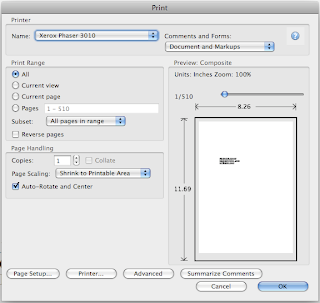
you can see i'm trying to print a document which has 510 pages using manual duplex option on Xerox phaser 3010.
v) But when you want to print in multiples of 20 pages of original, i
said we need only 10 sheets and i had asked to load quite a chunk of
sheets to print these first 20 pages. If you want to print only 20
sheets, then template would like below:
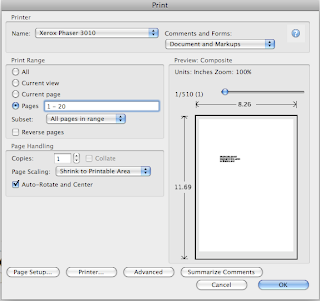
you can see pages 1 - 20 in this template.
vi) Once you get this go to the next option 'Sub set' below that. Here
choose 'Even pages only' option. And then select 'Reverse pages' option
too. Now the template looks like this:
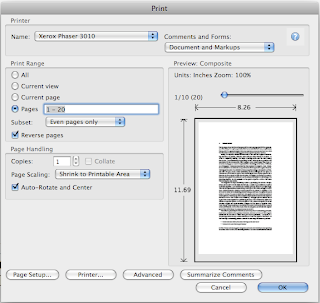
vii) Now click 'ok'. Once you click ok, it will print pages 20, 18,
16......2 thats it. Wait till it prints 2 i.e. completes its task of
printing all even numbered pages between 1 - 20 in reverse order. After
this, now discard all other blank sheets from the tray since I had asked
you to pick a larger chunk greater than 10 sheets. Now those 10 printed
sheets are at the top. Don't touch and disturb the order. Follow the
next few steps carefully, which are important and will reduce your work
to great extent.
viii) Now the those printed sheets are actually in a manner in which the
page no. 2 is at the top but with a blank sheet facing you while page 2
is face down. Which means page no. 1 will be printed on this page. Now,
you pick those 10 sheets and load them onto tray but while doing so
rotate the sheets 180 degrees as that is the feeding position. Once you
load, again click 'Print' option. After clicking print operation, next
follow the same procedure i.e.
- go to pages 1 - 20; go to subset, now opt 'Odd pages only' option; and
then undo the Reverse pages option. It will look like the template
shown below:
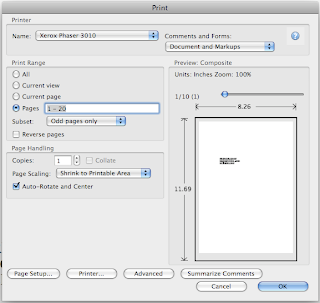
Now click ok.
ix) Now odd page nos. 1, 3 ....19 will be printed on the back side of those even numbered pages.
x) Now get the rhythm right. Next go for pages 21 - 40 and so on...
Now why i asked you initially to pick a chunk of sheets instead of
exactly 10 is that there is every bit a chance of you picking only 9
sheets and giving command to print 1-20 which causes error and
everything will be printed wrongly. So, when you pick a chunk, you can
avoid this error. I committed this error and wasted 10 sheets.
Tuesday, September 24, 2013
Epson Printer C45 Resetter
Waste ink counter Epson C41, C42, C43, C43, C44, C45, C56 and ME1
- Download Software
- UNZIP file C4146.rar
- RUN AdjProg.exe file
- Select Printer Type, Ok
- Click Maintenance Tab
- Check Protection counter, Clearing protection counter
- Ok, Ok
- done
Monday, September 23, 2013
How to reset the protection counter of Epson L100 printer

FIX PRINTER ERROR "parts inside printer end service life, waste ink pad counter overflow error"
Please follow the steps below to reset the protection counter effectively.
- Double click Adjprog.exe.
- Click “Accept” button.
- Click "Select" button. and choose your printer model then click "OK"
- Click “Particular adjustment mode” button.
- Select on “Waste ink pad counter” and click “OK” button.
- Check on Main pad counter and click on “Initialization” button and the program will reset the protection counter.
- Turn off the printer as a program instructed then turn on again.
- Click “Finish” button. and its done!
Adjprog.exe
Subscribe to:
Posts (Atom)