Showing posts with label stylus. Show all posts
Showing posts with label stylus. Show all posts
Saturday, November 30, 2013
How to Reset Epson Stylus 860

To perform the reset tiens what to do is the following:
Hay que presionar y mantener apretado el boton de LOAD/EJECT (tomar hoja) y el de Cleaning (limpieza) . We must press and hold the button LOAD / EJECT (take up) and the Cleaning (cleaning).
Mientras mantienes apretados esos botones , tienes que presionar el boton de POWER (encendido) y tenerlo apretado hasta que las luces (ink out – tinta vacia y paper out- falta papel) empiezan a titilar o parpadear. While holding these buttons, you must press the power button (on) and keep it tight until the lights (ink out - empty ink and paper out-out of paper) start to flash or flicker.
Cuadno suceda esto suelta todos los botones. When it has to happen this release all buttons.
Cuando pasen 3 o 4 segundos apreta y mantenlo apretado el boton de CLEANING (limpieza) hasta que las luces que titilaban dejen de hacerlo. When you spend three or four seconds click and hold down the button CLEANING (cleaning) until the lights flickered stop.
YA ESTA!!! NOW THIS! ya quedo lista para usarla!! and am ready to use!
Seria conveniente que cada vez que se haga este procedimiento hacer una limpieza a la esponja interna de la impresora, por que alli deja depositado todo el exceso de tinta de la impresora y podria derramarse. It would be desirable that each time you do this procedure done to clean the sponge inside the printer, because there left on deposit all excess ink from the printer and may spill. Esto no es 100 % necesario pero seria muy bueno que lo hagas. This is not 100% necessary but it would be very good to do so.
Hay que presionar y mantener apretado el boton de LOAD/EJECT (tomar hoja) y el de Cleaning (limpieza) . We must press and hold the button LOAD / EJECT (take up) and the Cleaning (cleaning).
Mientras mantienes apretados esos botones , tienes que presionar el boton de POWER (encendido) y tenerlo apretado hasta que las luces (ink out – tinta vacia y paper out- falta papel) empiezan a titilar o parpadear. While holding these buttons, you must press the power button (on) and keep it tight until the lights (ink out - empty ink and paper out-out of paper) start to flash or flicker.
Cuadno suceda esto suelta todos los botones. When it has to happen this release all buttons.
Cuando pasen 3 o 4 segundos apreta y mantenlo apretado el boton de CLEANING (limpieza) hasta que las luces que titilaban dejen de hacerlo. When you spend three or four seconds click and hold down the button CLEANING (cleaning) until the lights flickered stop.
YA ESTA!!! NOW THIS! ya quedo lista para usarla!! and am ready to use!
Seria conveniente que cada vez que se haga este procedimiento hacer una limpieza a la esponja interna de la impresora, por que alli deja depositado todo el exceso de tinta de la impresora y podria derramarse. It would be desirable that each time you do this procedure done to clean the sponge inside the printer, because there left on deposit all excess ink from the printer and may spill. Esto no es 100 % necesario pero seria muy bueno que lo hagas. This is not 100% necessary but it would be very good to do so.

Friday, November 29, 2013
EPSON STYLUS 1390 Resetter
 a. Epson Stylus 1390 Printer Driver is installed first, and make sure the printer is connect to the computer
b. Make sure you have the Software Resetter Printer Epson Stylus 1390.
c. Make sure that the damages requested in the printer reset counter (usually red flame of the lamp on the printer - and turns green print head does not move)
Here is how to use the Software Resetter Epson Stylus 1390:
1. Connect the power cable and printer cable printer usb, then turn on the printer. Leave the printer in the blink condition
2. IMPORTANT!!. Change dates to now.
If not changed then the software can not be changed and will display an error message:
tutorial resetter Epson 1390
3. Open Software Resetter Epson Stylus 1390.
4. Click Accept.
5. Select Particular Adjustment mode. At the Maintenance menu, select Waste ink pad counter
6. Click Check to see the results of the last counter value
7. Click OK to continue
8. Here is the display counter values results from the printer
9. Click initialization to process reset counter
10. Click OK, and then turn off the printer and unplug the power cable
11. Reattach the power cable and turn on the printer. Wait until the printer calibration is completed
12. After the printer is ready, click on Check to see value in the counter after reset. Click OK to continue
13. The final result after the reset counter value using Software Resetter Epson Stylus 1390
Thursday, November 28, 2013
Epson Stylus 600 printer resetter

This procedure is to reset the Epson Stylus 600 printer when are the lights will blink and will not let you print.
Para realizar el reset lo que tiens que hacer es lo siguiente: To perform the reset tiens what to do is the following:
Hay que presionar y mantener apretado el boton de LOAD/EJECT (tomar hoja) y el de Cleaning (limpieza) . We must press and hold the button LOAD / EJECT (take up) and the Cleaning (cleaning).
Mientras mantienes apretados esos botones , tienes que presionar el boton de POWER (encendido) y tenerlo apretado hasta que las luces (ink out – tinta vacia y paper out- falta papel) empiezan a titilar o parpadear. While holding these buttons, you must press the power button (on) and keep it tight until the lights (ink out - empty ink and paper out-out of paper) start to flash or flicker.
Cuadno suceda esto suelta todos los botones. When it has to happen this release all buttons.
Cuando pasen 3 o 4 segundos apreta y mantenlo apretado el boton de CLEANING (limpieza) hasta que las luces que titilaban dejen de hacerlo. When you spend three or four seconds click and hold down the button CLEANING (cleaning) until the lights flickered stop.
YA ESTA!!! NOW THIS! ya quedo lista para usarla!! and am ready to use!
Seria conveniente que cada vez que se haga este procedimiento hacer una limpieza a la esponja interna de la impresora, por que alli deja depositado todo el exceso de tinta de la impresora y podria derramarse. It would be desirable that each time you do this procedure done to clean the sponge inside the printer, because there left on deposit all excess ink from the printer and may spill. Esto no es 100 % necesario pero seria muy bueno que lo hagas. This is not 100% necessary but it would be very good to do so.
Para realizar el reset lo que tiens que hacer es lo siguiente: To perform the reset tiens what to do is the following:
Hay que presionar y mantener apretado el boton de LOAD/EJECT (tomar hoja) y el de Cleaning (limpieza) . We must press and hold the button LOAD / EJECT (take up) and the Cleaning (cleaning).
Mientras mantienes apretados esos botones , tienes que presionar el boton de POWER (encendido) y tenerlo apretado hasta que las luces (ink out – tinta vacia y paper out- falta papel) empiezan a titilar o parpadear. While holding these buttons, you must press the power button (on) and keep it tight until the lights (ink out - empty ink and paper out-out of paper) start to flash or flicker.
Cuadno suceda esto suelta todos los botones. When it has to happen this release all buttons.
Cuando pasen 3 o 4 segundos apreta y mantenlo apretado el boton de CLEANING (limpieza) hasta que las luces que titilaban dejen de hacerlo. When you spend three or four seconds click and hold down the button CLEANING (cleaning) until the lights flickered stop.
YA ESTA!!! NOW THIS! ya quedo lista para usarla!! and am ready to use!
Seria conveniente que cada vez que se haga este procedimiento hacer una limpieza a la esponja interna de la impresora, por que alli deja depositado todo el exceso de tinta de la impresora y podria derramarse. It would be desirable that each time you do this procedure done to clean the sponge inside the printer, because there left on deposit all excess ink from the printer and may spill. Esto no es 100 % necesario pero seria muy bueno que lo hagas. This is not 100% necessary but it would be very good to do so.
Download Free Epson Stylus Photo TX810FW Resetter
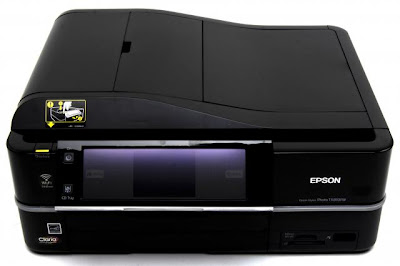
Before using the Software Resetter Epson Stylus Photo TX810FW, make sure:
a. Epson Stylus Photo Printer Drivers TX810FW already installed first, and make sure the printer is connect to the computer
b. Make sure you have the "Software Resetter Printer Epson Stylus Photo TX810FW"
c. Make sure that the damages requested in the printer reset counter (usually a red flame of the lamp on the printer all)
Here is a tutorial resetter Epson Stylus Photo TX810FW:
One. Prepare Adjustment Epson Stylus Photo Software TX810FW on your computer
2. If the software is compressed, the software used to extract resetter his Epson Stylus Photo TX810FW
3. Turn on the Printer
4. Open the folder resetter Epson Stylus Photo TX810FW Adjprog.exe you and run the file.
5. Click Particular adjustment mode menu entry to reset the printer counter
6. Find and click the Consumables menu maintenance counters, and then click OK
7. Put a check in the Main and Platen countre pad pad counters, and then click Check to find out the counter value at the time of blinking, and OK to continue the adjustment Epson tx810fw
Click initialization to change / reset the printer counter becomes zero, so the printer to be normal again. Then click OK to continue
8. Click Finish to end the process of resetting the counter Epson Stylus Photo TX810FW
9. Click Previous to return to main menu
10. Click Quit to exit the program counter reset Epson Stylus Photo TX810FW
11. Reset waste ink counter Epson Stylus Photo TX810FW already been done, turn off the printer for a while, then restart the printer, and wait until finished printer calibration
Tuesday, November 26, 2013
How to reset the protection counter of Epson Stylus R7880
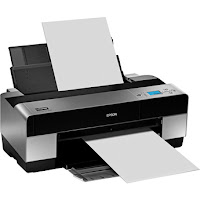
Epson Stylus Pro R7880 Adjustment Program
FIX PRINTER ERROR "parts inside printer end service life, waste ink pad counter overflow error"
Please follow the steps below to reset the protection counter effectively.
- Double click AdjProg.exe.
- Click “Accept” button.
- Click "Select" button. and select your printer model then click "OK"
- Click “Particular adjustment mode” button.
- Select on “Waste ink pad counter” and click “OK” button.
- Click on “Initialization” button and the program will reset the protection counter.
- Turn off the printer as a program instructed then turn on again.
- Click “Finish” button. and its done!
Warning: You might end up with ink leaking out of the printer if you dont either replace the waste ink pad or install external waste bin.
Friday, November 22, 2013
Resetter Epson Stylus Photo 1390
Need adjustment program or software resetter for Epson Stylus Photo 1390, download the software from download link below. To use this software is easy but this software only work on Windows XP. If you use newest windows version such as windows 7 You can use comparability mode to run this software without error. The unique feature on this software, this having shipping setting in maintenance menu feature. This function is implementing in case of nozzle expulsion troubles caused by the transport. This function will cleaning the printer and performed automatically when the printer is turned on.
Epson Stylus Photo 1390 is a Spectacular Epson printer and this printer can print Up To A3+ Size. Other feature, this printer using cost-efficient INKdividual cartridges to rediuce cost when printing.
 Reset waste ink Counter using adjustment program Epson Stylus Photo 1390
Epson Stylus Photo 1390 is a Spectacular Epson printer and this printer can print Up To A3+ Size. Other feature, this printer using cost-efficient INKdividual cartridges to rediuce cost when printing.
- Turn on the Printer.
- Set date setting in your computer to 4 October 2007.
- Run Adjustment Program by clicking “AdjProg.exe”.
- Select Accept
- Select Particular adjustment mode
- Select “Waste ink pad counter – OK
- Click Initialization to reset current protection counter to “Zero”.
- Turn off printer and turn on again.
Sunday, November 10, 2013
Resetter Epson Stylus Photo R220 and R230
Before run adjustment program or software resetter Epson Stylus Photo R220 and R230, set date setting in your computer to 12 January 2006. Appearance of adjustment program Epson stylus photo R220 and R230 like adjustment program for Epson C45. Your Epson Stylus Photo R220 and R230 must be installed correctly in your computer before using the software otherwise so this software resetter will not be used.
Epson R220 and R230 using 6 Individual Intellidge Colour Ink Cartridges and this printer designed for photo printing. This printer has a very high resolution up to 5760 x 1440 dpi and allows photo quality printing. It has parallel and USB interface to connected to computer and its compatible with Windows 98, Windows 2000, ME Windows XP and Macintosh.
 Here how to Reset Epson R220 and R230 using the software
Updated
If this software not work, you can also use SSC software to reset printer Epson R220 and Epson R230. the newest version of SSC software (SSC ver 3.40) support for this printers.
Epson R220 and R230 using 6 Individual Intellidge Colour Ink Cartridges and this printer designed for photo printing. This printer has a very high resolution up to 5760 x 1440 dpi and allows photo quality printing. It has parallel and USB interface to connected to computer and its compatible with Windows 98, Windows 2000, ME Windows XP and Macintosh.

- Download and extract downloaded software and run it.
- Click accept button.
- Set model name, port selection and destination setting and equal to your printer.
- Click Maintenance Tab.
- Check mark waste ink pad counter.
- And the clear the protection counter (reset counter to zero)
- Then click Ok, Ok
- done
Updated
If this software not work, you can also use SSC software to reset printer Epson R220 and Epson R230. the newest version of SSC software (SSC ver 3.40) support for this printers.
Monday, March 18, 2013
Epson Stylus T20E

Deskripsi
Amazing print speed, superb quality and longer lasting prints
Enjoy speed high quality and affordable printing with the Epson Stylus™ T20E
Assured Quality with Epson DURABrite™ Ultra Ink
* Ideal all-purpose ink for everyday printing
* Smudge, water and fade-resistant qualities ensures prints stay vibrant for many years to come
Epson INKdividual™ Cartridges for Maximum Value
* Replace only the cartridge that runs out
* Affordable INKdividual™ cartridges
* Reduce ink wastage and maximise savings
Excellent Print Speed to Boost Productivity
* Maximise time efficiency and productivity
* Achieve more in less time with excellent print speed of up to 26ppm
High Resolution for Superior Print Quality
Assured high quality printouts at up to 5760 dpi
Photo Perfection with Epson Creative Suite
* One-stop photo software solution
* Achieve photo lab quality prints in 3 simple steps with Epson Easy Photo Print
* Epson PhotoEnhance automatically adjusts images to give you amazing
true-to-life colour photos
Friday, March 8, 2013
Reseter Epson Stylus T13

1. The first step of course Epson T13 printer driver must be installed.
2. Download software resetter Epson T13 first. Epson Resetter Software named T13, you can download at the link below
3. Date computers do not need to be changed as previously resetter.
4. CAUTION! Turn off your Antivirus, because resetter T13 is detected as virus by antivirus software.
5. Run the program resetter Epson T13 with a double click on the "AdjProg.exe".
6. Then follow the following picture:


Check: used to counter check the maximum 7800 points, you can see it in the main pad counter. If more or close to 7800 points means the printer needs to be reset"
Initialization: used to reset or clear the counter back to the printer"
6. When finished turn the printer off then on again. The printer will flame with a full green light. Epson Stylus T13 printer means that blink had been ready for use again.
Download File : T13.zip
Pass : Klik
Subscribe to:
Posts (Atom)