Showing posts with label for. Show all posts
Showing posts with label for. Show all posts
Monday, November 25, 2013
Resetting Instructions for Epson Printers by Using Adjustment Program
This procedure is applicable for all Epson printers. In fact there are two models/versions software resetters or adjustment program for Epson printer (see the picture). Some adjustment program requires date setting to run the software without error and other not require.
Model 1 of Epson adjustment program(tab version)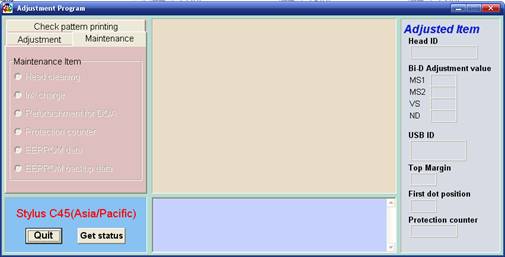
- Switch on the printer.
- Set computer date setting (if the adjustment programs require date setting).
- Run the adjustment program.
- Set printer model then click ok (if exist, usually there are adjustment program can be used at more than one printer).
- Click Maintenance Tab
- Check Protection counter.
- Click protection counter to reset counter to zero.
- Then click Ok, Ok
- switch off printer for 5secs then switch on again
- done
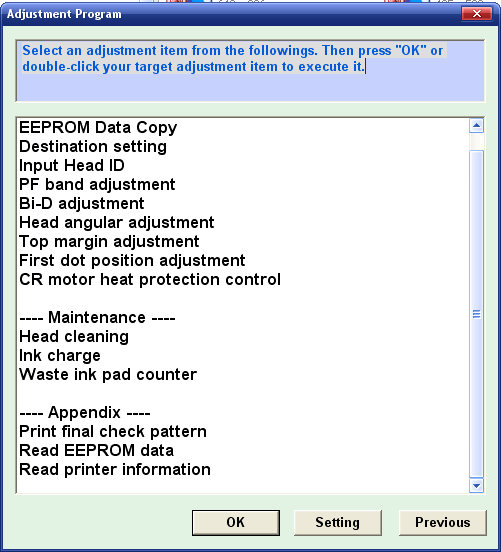
- Switch on printer.
- Set computer date setting (if the adjustment programs require date setting).
- Run the adjustment program.
- Set printer model then click ok (if exist, usually there are adjustment program can be used at more than one printer).
- Click particular adjustment mode.
- Select waste ink pad counter in the maintenance section then click ok or double click the menu.
- Click on “check button” or “read button” till its done then click on “initialization button” then click “finish”.
- switch off printer for 5secs then switch on again
- done

Wednesday, November 20, 2013
Reset waste ink pad counter overflow error for Epson L100 printer
.png)
Reset waste ink pad counter overflow error for Epson L100 printer
FIX PRINTER ERROR "parts inside printer end service life, waste ink pad counter overflow error"
Resetter of Epson L100 printer and How to Use it :
Reset tool of epson L100 can be downloaded at the following link Ziddu:
Password: www..comExtract using unzip program.
steps:1
Turn on Epson L100 and make sure that Espon L100 printer is connect to the computer.
Then run Reset tool AdjProgcracked.exe, by double clicking the file "AdjProg cracked.exe"
Step:2
Click "accept" Next "Particular Adjustment Mode" Then Select "Waste ink pad counter reset"
Next click "Check" Then uncheck "play pad counters, FL Boxes counter, tube Ink Counter", then click the "initialization" Then "Finish".
Step:3
Turn off the Epson L100 printer, then disconnect the power of the printer.
Step:4
Reattach the power cord and turn on the printer, wait a while until Epson L100 ready.
Now Epson L100 is ready for use again.
Saturday, November 16, 2013
Driver Download for Canon Pixma MP520 Driver

Tuesday, November 12, 2013
Driver Download for Epson L355 INK TANK SYSTEM PRINTER

Epson L355
Compatibility and System Requirements :
- Windows 8
- Windows 7
- Windows 7 (x64)
- Windows Vista
- Windows Vista (x64)
- Windows XP
Epson L355 Driver
Source direct Download link
Product name L355 Series
Language English, French, Dutch, Swedish, Czech, Danish, German, Spanish, Italian, Hungarian, Polish, Portuguese, Finnish, Turkish, Greek, Norwegian, Bulgarian, Estonian, Latvian, Lithuanian, Romanian, Russian, Arabic, Catalan, Slovak, Chinese, Kazakh, Korean, Thai, Ukrainian, Chinese (Simplified)
OS Windows XP, Windows Vista, Windows 7, Windows 8
Version Ver. 1.51(10-2012)
File name L355_x86_151UsHomeExportAsiaML_MP2.exe
File size 19.55 MB
PRINTER DRIVER DOWNLOAD HERE
Product name L355 Series
Language English, French, Dutch, Swedish, Czech, Danish, German, Spanish, Italian, Hungarian, Polish, Portuguese, Finnish, Turkish, Greek, Norwegian, Bulgarian, Estonian, Latvian, Lithuanian, Romanian, Russian, Arabic, Catalan, Slovak, Chinese, Korean, Ukrainian, Chinese (Simplified), Portuguese (Brazil)
OS Windows XP, Windows x64, Windows Vista, Windows Vista x64, Windows 7, Windows 7 x64, Windows 8, Windows 8 x64
Version Ver. 3.7.9.1(01-2013)
File name L355_WW_WIN_3791_41.exe
File size 21.44 MB
SCANNER DRIVER DOWNLOAD HERE
Source direct Download link
Product name L355 Series
Language English, French, Dutch, Swedish, Czech, Danish, German, Spanish, Italian, Hungarian, Polish, Portuguese, Finnish, Turkish, Greek, Norwegian, Bulgarian, Estonian, Latvian, Lithuanian, Romanian, Russian, Arabic, Catalan, Slovak, Chinese, Kazakh, Korean, Thai, Ukrainian, Chinese (Simplified)
OS Windows XP, Windows Vista, Windows 7, Windows 8
Version Ver. 1.51(10-2012)
File name L355_x86_151UsHomeExportAsiaML_MP2.exe
File size 19.55 MB
PRINTER DRIVER DOWNLOAD HERE
Product name L355 Series
Language English, French, Dutch, Swedish, Czech, Danish, German, Spanish, Italian, Hungarian, Polish, Portuguese, Finnish, Turkish, Greek, Norwegian, Bulgarian, Estonian, Latvian, Lithuanian, Romanian, Russian, Arabic, Catalan, Slovak, Chinese, Korean, Ukrainian, Chinese (Simplified), Portuguese (Brazil)
OS Windows XP, Windows x64, Windows Vista, Windows Vista x64, Windows 7, Windows 7 x64, Windows 8, Windows 8 x64
Version Ver. 3.7.9.1(01-2013)
File name L355_WW_WIN_3791_41.exe
File size 21.44 MB
SCANNER DRIVER DOWNLOAD HERE
Monday, November 11, 2013
Driver Download for Epson Expression Home XP 102 Driver

Epson Expression Home XP-102
- File name : epson374730eu.exe
- File Size : 21.08MB
- Version : 7.00
- Release Date : 14-Sep-2012
Compatibility and System Requirements :
- Windows 8
- Windows 8 (x64)
- Windows 7
- Windows 7 (x64)
- Windows Vista
- Windows Vista (x64)
- Windows XP
Thursday, September 26, 2013
Resetter Code for Canon BJ F900

1. Turn off the printer.
2. Press and hold the RESUME button, then press and hold the POWER button.
3. Release the RESUME button, then press and release the RESUME button two more times in succession. (youre still holding the POWER button during this). The printer mechanics will move momentarily.
4. You are now in Service mode.
5. Pressing the RESUME key will select a function; for example, pressing RESUME 4 times will select the clear waste ink counter function. The lamp will alternate color with each key press.
(a). service/factory test printout, including ink sensor check
(b). EEPROM info printout
(c). EEPROM initialization
(d). Clear the waste-ink counter
(e). Printer model setting. (more selections beyond this- leave this alone)
6. After selecting mode, press the POWER button to commit the change, and return to the top of the function selection menu. Pressing the POWER button again turns off the printer for a resta
The Secret Resetter Code for Canon BJ-30 BJC-35v BJC-70
F14 Error Reset
1. Unplug adapter
2. Hold POWER
3. Plug in ADAPTER
4. Release POWER after printer starts
5. Hold FF and MENU and press POWER
6. Release after beeps
7. Press <> Cartridge until 1A is displayed
8. Press ONLINE
9. Press POWER to shutoff printer
10. Unplug printer then re-plug printer
Thursday, September 12, 2013
Programming with Java Swing courses for beginners
This course is intended for beginners Swing. You may know, others who are using it, or you saw in the application you are using. Maybe youve even dabbled with it. In any case, this tutorial will guide you through all the necessary basic Swing application, starting with the ubiquitous HelloWorld application. After you get it running on your computer, we will build on their knowledge of Swing by creating a system make booking until you have a basic but fully functional application.
Table of content:
-Before the start of
-Introduction to Swing
-A simple Swing widgets
-Other Swing widgets
-The concepts of swing
-To put it all together
-Summary
-The Source
Subscribe to:
Posts (Atom)