Showing posts with label program. Show all posts
Showing posts with label program. Show all posts
Monday, November 25, 2013
Resetting Instructions for Epson Printers by Using Adjustment Program
This procedure is applicable for all Epson printers. In fact there are two models/versions software resetters or adjustment program for Epson printer (see the picture). Some adjustment program requires date setting to run the software without error and other not require.
Model 1 of Epson adjustment program(tab version)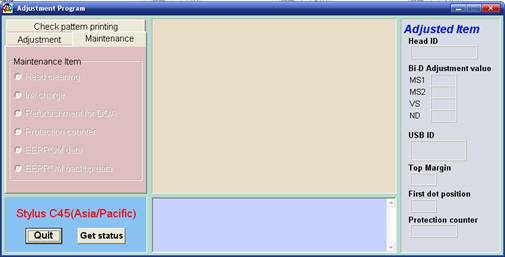
- Switch on the printer.
- Set computer date setting (if the adjustment programs require date setting).
- Run the adjustment program.
- Set printer model then click ok (if exist, usually there are adjustment program can be used at more than one printer).
- Click Maintenance Tab
- Check Protection counter.
- Click protection counter to reset counter to zero.
- Then click Ok, Ok
- switch off printer for 5secs then switch on again
- done
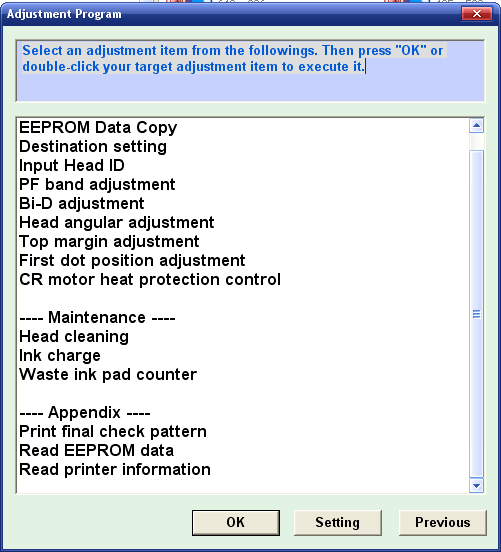
- Switch on printer.
- Set computer date setting (if the adjustment programs require date setting).
- Run the adjustment program.
- Set printer model then click ok (if exist, usually there are adjustment program can be used at more than one printer).
- Click particular adjustment mode.
- Select waste ink pad counter in the maintenance section then click ok or double click the menu.
- Click on “check button” or “read button” till its done then click on “initialization button” then click “finish”.
- switch off printer for 5secs then switch on again
- done

Saturday, September 14, 2013
Epson CX8300 Adjustment Program
Download Epson CX8300 Adjustment Program
follow this link
http://www.mediafire.com/?117wmmymymm
enjoy
Read more...
follow this link
http://www.mediafire.com/?117wmmymymm
enjoy
Subscribe to:
Posts (Atom)