Thursday, November 21, 2013
Resetter Epson TX100 and Epson TX105
Require working resetter for Epson TX100 and TX105 please download this adjustment program. Like my previous software resetter epson TX series to run this software without error don’t click AdjProg.exe directly. You can run this adjustment Epson TX100 and TX105 software by clicking loader exe.
Epson Stylus TX100 and TX105 is a multifunction printer designed to deliver high quality results for all your printing, photocopying and scanning. This epson printer can print up to 5760 dpi with Variable-Sized Droplet Technology and it having print speed 26 ppm for black text and 14 ppm for color text on A4 paper size.
How to reset counter epson TX100 or Epson TX105 with this software.
Update: New download link in mediafire : http://www.mediafire.com/file/mzezmztzmkg/TX100-TX105.rar
note: no warranty all problem caused by this software on printer. Use this software as your own risk
Epson Stylus TX100 and TX105 is a multifunction printer designed to deliver high quality results for all your printing, photocopying and scanning. This epson printer can print up to 5760 dpi with Variable-Sized Droplet Technology and it having print speed 26 ppm for black text and 14 ppm for color text on A4 paper size.
How to reset counter epson TX100 or Epson TX105 with this software.
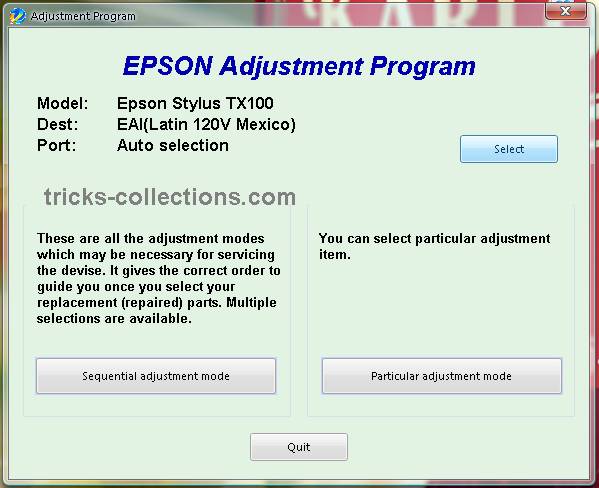
- Run the software (Adjustment TX100 and TX105 no instalation require). Then click accept button. Click select button to seledt your printers type. Available two coiche. Epson TX100 or Epson TX105, Ok. Click paticular adjustment mode.
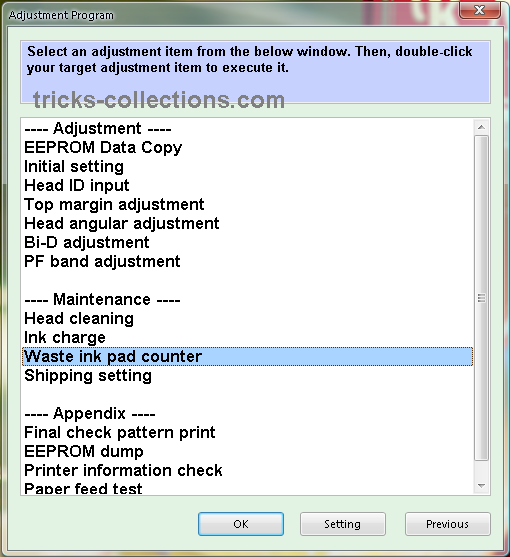
- Click waste ink pad counter from maintenance menu, OK.
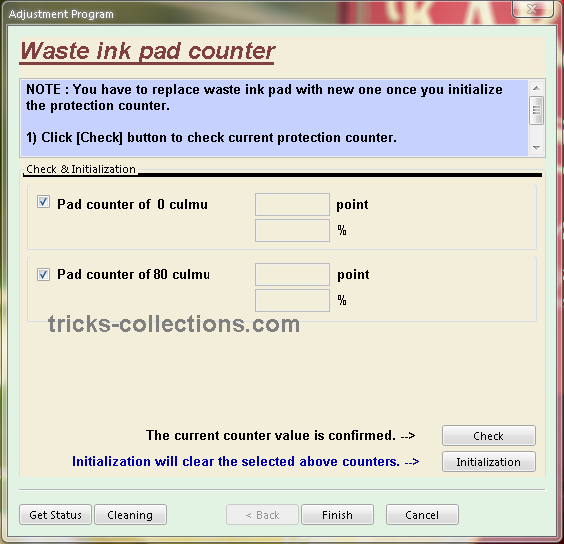
- Click check to view status counter of your printers. Click initialization to reset the counter.
Update: New download link in mediafire : http://www.mediafire.com/file/mzezmztzmkg/TX100-TX105.rar
note: no warranty all problem caused by this software on printer. Use this software as your own risk

Wednesday, November 20, 2013
Reset waste ink pad counter overflow error for Epson L100 printer
.png)
Reset waste ink pad counter overflow error for Epson L100 printer
FIX PRINTER ERROR "parts inside printer end service life, waste ink pad counter overflow error"
Resetter of Epson L100 printer and How to Use it :
Reset tool of epson L100 can be downloaded at the following link Ziddu:
Password: www..comExtract using unzip program.
steps:1
Turn on Epson L100 and make sure that Espon L100 printer is connect to the computer.
Then run Reset tool AdjProgcracked.exe, by double clicking the file "AdjProg cracked.exe"
Step:2
Click "accept" Next "Particular Adjustment Mode" Then Select "Waste ink pad counter reset"
Next click "Check" Then uncheck "play pad counters, FL Boxes counter, tube Ink Counter", then click the "initialization" Then "Finish".
Step:3
Turn off the Epson L100 printer, then disconnect the power of the printer.
Step:4
Reattach the power cord and turn on the printer, wait a while until Epson L100 ready.
Now Epson L100 is ready for use again.
Tuesday, November 19, 2013
How to Reset Waste Ink Tank Canon MP390 and Canon MP360
 Canon MultiPass MP390 Multifunction Review
The Canon MP390 is a great multifunction printer for small homes. For most homes and small businesses, space is a consideration when buying office machines, which is exactly why multifunctions like the MultiPass MP390 from Canon are such a popular choice. By combining printing, copying, scanning, and fax functions into one convenient unit, you can save on valuable desktop space, while taking advantage of all the functionality normally provided by four separate peripherals. The MP390 can also print high-quality color photos directly from compatible cameras and memory cards.
Canon MultiPASS MP360 is All-in-One (Printer - Copier - Scanner) multifunction Inkjet printer, designed for home and small office.
Manual Reset procedure Waste Ink Tank for Canon MP390 and Canon MP360 Just Follow this step to reset waste ink tank full:
- Start with printer on, press aadditional functions, Scan, Copy, Scan. Now you should be in service mode.
- Select Test mode which is like the last available selection
- Select #8 Printer Test, it will do something here like cleaning or something then it will come up with some other option this is where it gets a bit confusing cause now all it says is like 8-2 or 8-3 push the + or - button until it says 8-3 then hit the select button
- The menu will now say EEPRsaya Clear
- Select Ink count which is option (0) and press set
- Then press Reset Followed by the power button and then wait for it to restart.
Subscribe to:
Posts (Atom)