Friday, November 22, 2013
Resetter Epson CX5500
To run resetter Epson cx5500 no require date setting in your computer. But I’m not sure with this software, because the appearance of this Epson CX5500 resetter different from other Epson adjustment program. Unfortunately I did not found alternative software resetter other that this software.
Epson Stylus CX 5500 All in One printer with DURABrite Ultra Ink. This printer can print and copy with one-touch buttons with print speed up to 25 ppm (page per minutes) and can print image up to up to 5760 x 1440 dpi. This printer also can directly scan to PC at 600 dpi.
 How to run software resetter Epson cx5500
Epson Stylus CX 5500 All in One printer with DURABrite Ultra Ink. This printer can print and copy with one-touch buttons with print speed up to 25 ppm (page per minutes) and can print image up to up to 5760 x 1440 dpi. This printer also can directly scan to PC at 600 dpi.
- Download and extract the file.
- Run “ServiceFT.exe”
- Select waste ink pad counter from maintenance item, double click to execute it.
- Click Initialization button to reset current protection counter to Zero.
- Read(again) after “0″ press finish
- Choose set shipping data (bottom menu)
- Choose set
- Wait for a while (about 1 minute)
- If there is a reaction from the printer (it will load some paper or you hear “klothak” sound), the reset process will be done. turn off the printer and then turn on again. repeat read the EEPRsaya
- If there is no reaction from the printer, repeat step 1

Thursday, November 21, 2013
Resetter Epson TX100 and Epson TX105
Require working resetter for Epson TX100 and TX105 please download this adjustment program. Like my previous software resetter epson TX series to run this software without error don’t click AdjProg.exe directly. You can run this adjustment Epson TX100 and TX105 software by clicking loader exe.
Epson Stylus TX100 and TX105 is a multifunction printer designed to deliver high quality results for all your printing, photocopying and scanning. This epson printer can print up to 5760 dpi with Variable-Sized Droplet Technology and it having print speed 26 ppm for black text and 14 ppm for color text on A4 paper size.
How to reset counter epson TX100 or Epson TX105 with this software.
Update: New download link in mediafire : http://www.mediafire.com/file/mzezmztzmkg/TX100-TX105.rar
note: no warranty all problem caused by this software on printer. Use this software as your own risk
Epson Stylus TX100 and TX105 is a multifunction printer designed to deliver high quality results for all your printing, photocopying and scanning. This epson printer can print up to 5760 dpi with Variable-Sized Droplet Technology and it having print speed 26 ppm for black text and 14 ppm for color text on A4 paper size.
How to reset counter epson TX100 or Epson TX105 with this software.
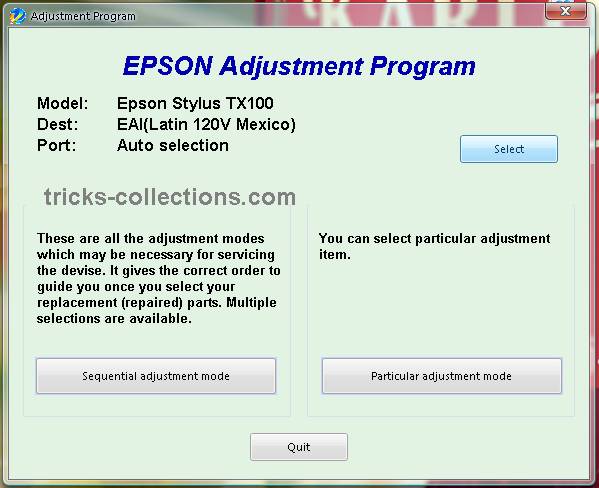
- Run the software (Adjustment TX100 and TX105 no instalation require). Then click accept button. Click select button to seledt your printers type. Available two coiche. Epson TX100 or Epson TX105, Ok. Click paticular adjustment mode.
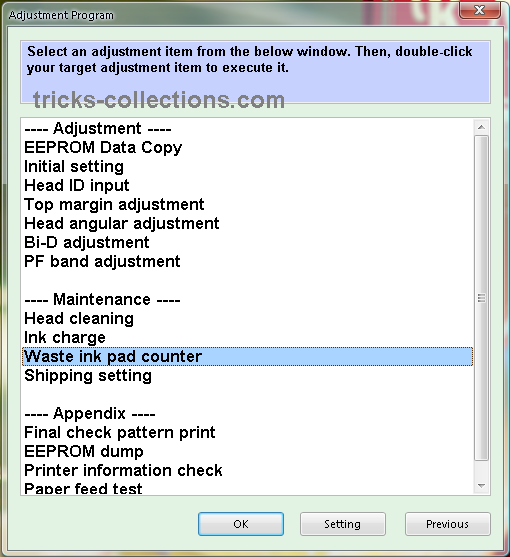
- Click waste ink pad counter from maintenance menu, OK.
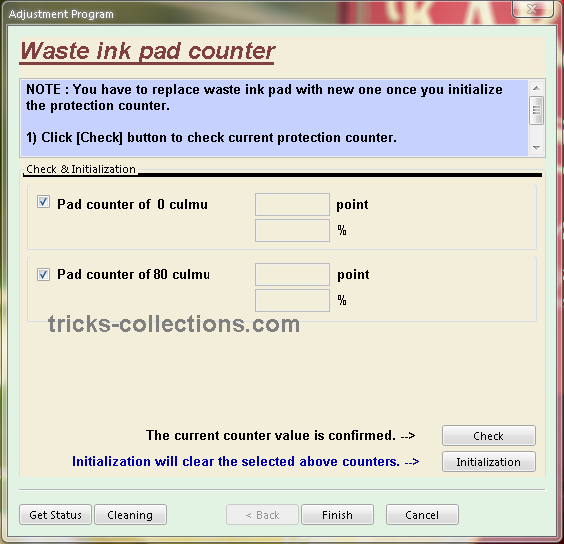
- Click check to view status counter of your printers. Click initialization to reset the counter.
Update: New download link in mediafire : http://www.mediafire.com/file/mzezmztzmkg/TX100-TX105.rar
note: no warranty all problem caused by this software on printer. Use this software as your own risk
Wednesday, November 20, 2013
Reset waste ink pad counter overflow error for Epson L100 printer
.png)
Reset waste ink pad counter overflow error for Epson L100 printer
FIX PRINTER ERROR "parts inside printer end service life, waste ink pad counter overflow error"
Resetter of Epson L100 printer and How to Use it :
Reset tool of epson L100 can be downloaded at the following link Ziddu:
Password: www..comExtract using unzip program.
steps:1
Turn on Epson L100 and make sure that Espon L100 printer is connect to the computer.
Then run Reset tool AdjProgcracked.exe, by double clicking the file "AdjProg cracked.exe"
Step:2
Click "accept" Next "Particular Adjustment Mode" Then Select "Waste ink pad counter reset"
Next click "Check" Then uncheck "play pad counters, FL Boxes counter, tube Ink Counter", then click the "initialization" Then "Finish".
Step:3
Turn off the Epson L100 printer, then disconnect the power of the printer.
Step:4
Reattach the power cord and turn on the printer, wait a while until Epson L100 ready.
Now Epson L100 is ready for use again.
Subscribe to:
Posts (Atom)