Sunday, November 17, 2013
Reset Epson T50 and T60 Without Error 21000068
Get an error 21000068 when resetting your Epson T50 or T60 and not see any solution to prevent the problem. Why not try this tip. But this method not recommended for beginner user and you must understand what you are doing.
Here the reset method Epson T50 and T60 without error 21000068 :
Here the reset method Epson T50 and T60 without error 21000068 :
- Turn off printer and open printer.
- Open your Epson main PCB board. You can view an 8 pin CMOS IC. That is Epson waste ink counter IC and found on all Epson Printer.

- You can reset your printer without any resetter by following these ways.
- Soldering pin no 1,2,3,4 by wire as show in PICTURE and now turn on printer for ”20 second”

- After 20 second turn off printer and remove soldering wire from pin no. 1,2,3,4 ( back in original condition)
- Now turn on your printer
- And now your printer will be RESET
Note : This method is not recommended for beginners so you have to understand what you are doing. All problem caused by this tutorials is not our responsibility. Use this tutorial as your own risk.


Saturday, November 16, 2013
Driver Download for Canon Pixma MP520 Driver

Friday, November 15, 2013
Resetter Epson T10
Many tricks-collections.com reader ask me “where I can download software resetter Epson T10 or T11”, Now I get download link for software resetter or adjustment program for Epson T10 or T11. But the software mentioned here is not original adjustment program Epson T10 because the software has cracked by OrTHoTaMiNe. Although its cracked program, all features on this software work fine.
Epson Stylus T10 is Inkjet Printer with water and smudge resistant prints with 4 color individual cartridges and this printers have using Epson DURABrite Ultra Inks. This epson printer is best choice for home user if require high resolution print quality because this printer can print up to 5760 x 1440 dpi with print speed 22 ppm (black) and 13 ppm (color). Interface this printer to connected to PC using USB 2.0.
 Unlike previous adjustment program for epson, to use this resetter no date setting require. You can click direcly AdjProg,Exe to run the resetter.
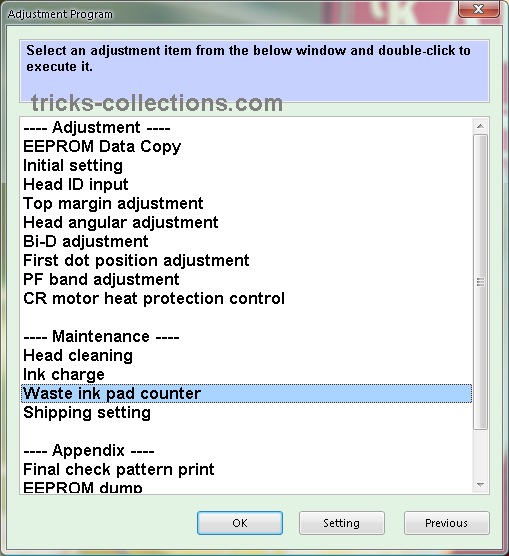
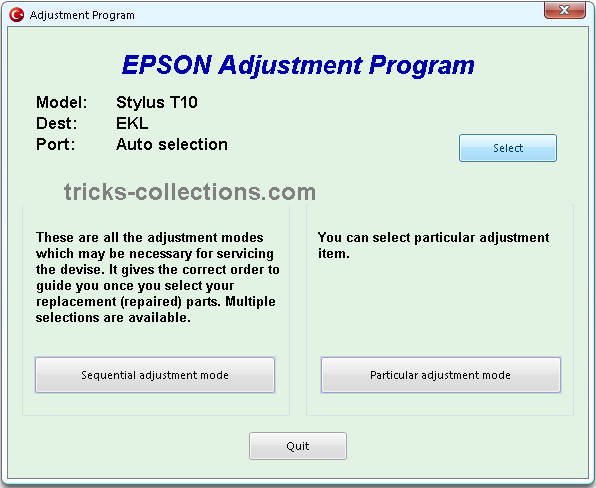
Here some look n feel of adjustment program Epson T11:


Download Adjustment Program Epson T10 or Epson T11: http://rapidshare.com/files/293895708/T10.rar.html
Updated: Request from reader, I have upload the software to new location. New download link on the software on MediaFire: Resetter Epson T10 and T11
Epson Stylus T10 is Inkjet Printer with water and smudge resistant prints with 4 color individual cartridges and this printers have using Epson DURABrite Ultra Inks. This epson printer is best choice for home user if require high resolution print quality because this printer can print up to 5760 x 1440 dpi with print speed 22 ppm (black) and 13 ppm (color). Interface this printer to connected to PC using USB 2.0.
Here some look n feel of adjustment program Epson T11:
Download Adjustment Program Epson T10 or Epson T11: http://rapidshare.com/files/293895708/T10.rar.html
Updated: Request from reader, I have upload the software to new location. New download link on the software on MediaFire: Resetter Epson T10 and T11
Subscribe to:
Posts (Atom)